
DuckDuckGo has introduced built-in YouTube ad blocking in its browser, which prevents most video ads from appearing before and during playback.
This feature comes enabled by default in the latest versions of DuckDuckGo for iOS, Mac, and Windows. Android users can turn it on manually through Settings, Ad Blocking.
The system uses community-maintained filter lists from uBlock Origin, along with DuckDuckGo’s own compatibility rules. This ad blocking feature is different from Duck Player, DuckDuckGo’s embedded YouTube player. Both options can be used simultaneously.
What DuckDuckGo’s YouTube Ad Blocking Does
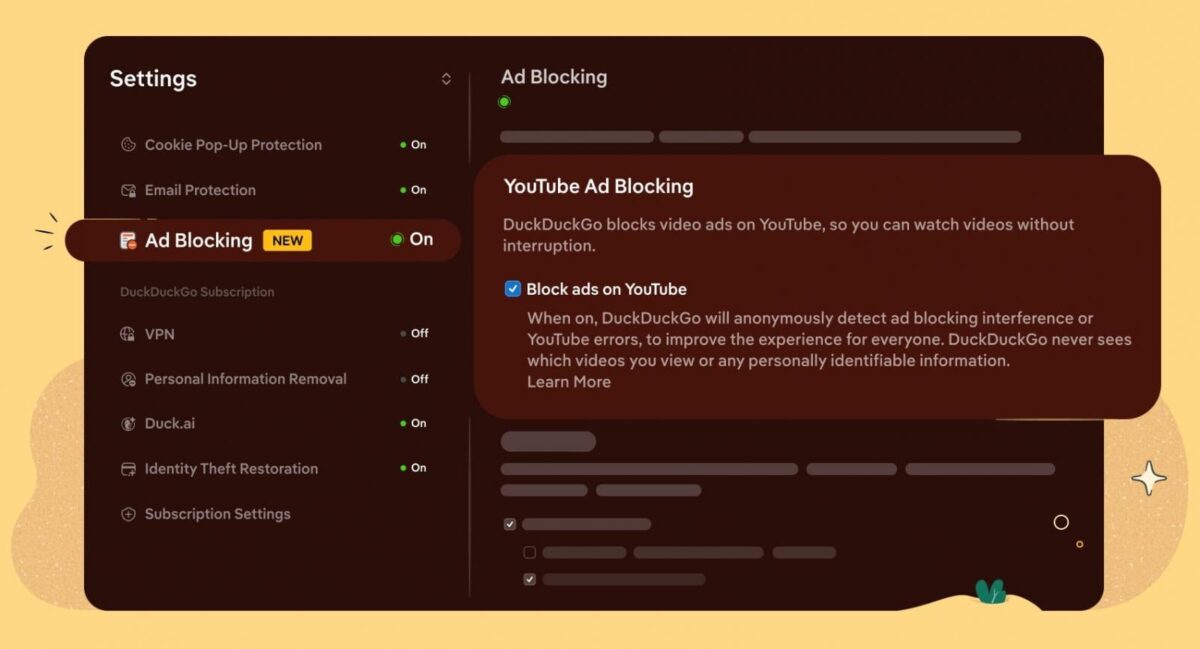
According to DuckDuckGo’s announcement, their YouTube ad blocker targets pre-roll ads that appear before videos, mid-roll ads during playback, and standard skippable and unskippable video ads on the YouTube website.
DuckDuckGo states that the feature preserves the usual YouTube experience, including watch history, video position saving in playlists, and other account features that require login.
The company also mentioned that using the ad blocker might cause slightly longer buffering times, but once a video starts playing, the experience should remain smooth.
Unlike browsers that come with fully built-in ad-blocking engines, DuckDuckGo’s approach relies on filter lists from uBlock Origin maintained by the community, along with additional rules developed by DuckDuckGo and regular updates to keep up with YouTube’s changing ad delivery methods.
Because YouTube often updates how it serves ads, the system may periodically stop working until the filter rules are updated, which is similar to what other browser-based YouTube ad blockers experience.
Duck Player, Setup Steps, and Platform Support
Duck Player is DuckDuckGo’s embedded YouTube player that uses YouTube’s strictest privacy settings to prevent tracking cookies and personalized ads. It has been available for some time and remains separate from the new ad-blocking feature.
Both features can be used together:
- Duck Player offers enhanced privacy protections when watching YouTube videos through the embedded player.-
- YouTube Ad Blocking removes ads when browsing the site directly.
Users seeking maximum protection can enable both features, combining privacy safeguards with ad removal.
For iOS, Mac, and Windows users:
The feature comes enabled by default in the latest DuckDuckGo browser update. Users on older versions should update the app via the App Store on iOS or Mac, or through the browser’s built-in updater on Windows.
Android users:
- Open the DuckDuckGo browser
- Tap the three-dot menu
- Go to Settings
- Tap on Ad Blocking
- Enable YouTube Ad Blocking
Anyone can submit anonymous feedback about the feature through the browser’s options menu. As the feature is new, user testing and feedback are important for DuckDuckGo to improve the filter rules and resolve compatibility issues.
Limitations, Browser Comparisons, and Availability
DuckDuckGo has acknowledged a few important caveats:
- Buffering times might be slightly longer at the start, and
- YouTube’s new ad delivery changes could cause temporary disruptions until filter lists are updated.
- The feature is new and may not be stable in all cases.
- Some ad types or newly introduced formats might bypass filters until rules catch up.
Users experiencing issues can submit feedback directly through the browser options menu, which helps DuckDuckGo prioritize fixes.
DuckDuckGo now joins Brave and Opera, which both include built-in ad and tracker blockers capable of blocking most YouTube ads without the need for third-party extensions.
Firefox continues to support uBlock Origin as an extension, while Chrome has restricted extension-based ad blockers due to the transition to Manifest V3.
For users choosing a browser based on YouTube ad blocking,
- DuckDuckGo has a new default setting on iOS, Mac, and Windows, with manual setup on Android.
- Brave has long offered built-in ad blocking,
- Opera provides a built-in ad blocker across platforms, and
- Firefox works with the uBlock Origin extension.
- Chrome has limited extension-based blocking under Manifest V3.
YouTube’s ads have become more frequent, longer, and sometimes unskippable in recent years. Subscribing to YouTube Premium removes ads but costs $15.99 per month in the US after a recent price increase. Many free users looking to avoid ads have turned to browser-based blockers, third-party clients, or alternative players.
YouTube has occasionally pushed back against ad blockers by issuing warnings or limiting playback for users who block ads. The future success of DuckDuckGo’s YouTube Ad Blocking will depend on how the company responds to YouTube’s countermeasures.
The latest DuckDuckGo browser releases on iOS, Mac, Windows, and Android now include YouTube Ad Blocking. Users can update through their platform’s app store or the browser’s built-in updater.
Those testing the feature should be aware that its effectiveness may vary as YouTube adjusts its ad delivery. DuckDuckGo has committed to updating its filter rules as needed.
The company has not specified whether YouTube Ad Blocking will be available on DuckDuckGo’s mobile Linux version or other platforms.
Thank you for being a Ghacks reader. The post DuckDuckGo Browser Adds Built-in YouTube Ad Blocking on iOS, Mac, Windows, and Android appeared first on gHacks.